Disclosure: As an Amazon Associate, Small Home Rhythm may earn from qualifying purchases. Availability and variants can change.
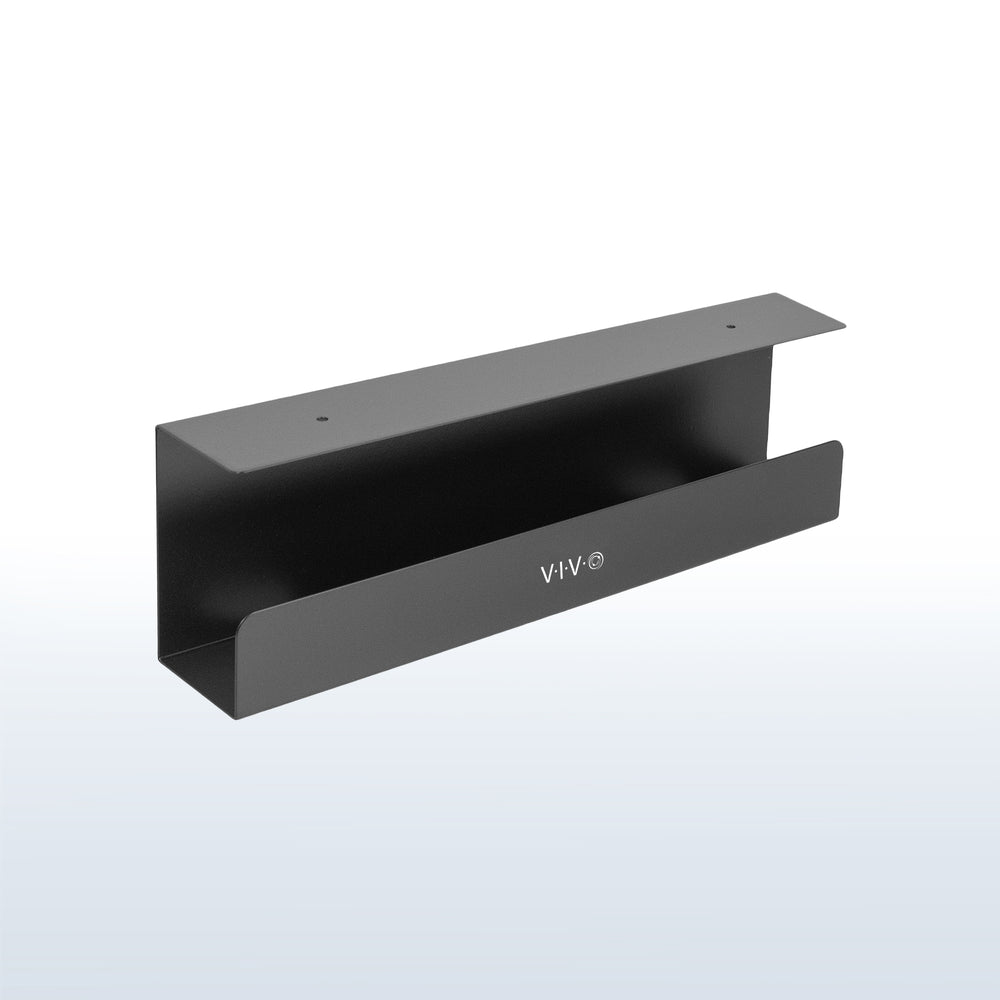
A steel tray can lift a power strip off the floor; the VIVO DESK-AC06-1C depends on desk material, screw clearance and cord access.
Check the desk before the cables
The VIVO DESK-AC06-1C is a steel under-desk tray designed to screw into a compatible desktop. The product listing describes a roughly 17-inch rack and an 11-pound listed capacity. The practical first question is whether your desk allows screws without piercing the top, hitting a metal frame or violating a rental-furniture rule. Measure the top thickness, underside obstructions and mounting-hole spacing against the current installation guide. Do not treat the load figure as a reason to overload a thin particleboard top. This is a listing-based fit review, not a tested weight-capacity claim.

Draw the moving cable route
A desk pushed against the wall still needs enough slack to move for cleaning. Trace power from wall outlet to surge protector, then to each device. Keep enough length for chair movement and any adjustable desk travel, but prevent loose loops from reaching feet and casters. Do not trap plugs where they cannot be disconnected. If a power brick is wider than the tray’s usable cavity, the tray may organize cables without holding that brick. A tray solves a defined route; it does not reduce the number of chargers in use.

Install with servicing in mind
Before drilling, unplug the equipment and hold the empty tray against the desk to check knee and chair clearance. Mark screw locations, confirm the supplied hardware suits the desktop material, and use the manufacturer’s instructions. Place power equipment so switches and plugs can be reached without crawling behind the desk. Avoid packing cords tightly, covering ventilation or altering electrical plugs. Group cables with reusable ties rather than permanent knots; you will eventually replace a monitor, router or charger. Photograph the setup before moving devices so the next reset is easier. You may also find Amazon Basics Adjustable Monitor Stand Review: Will It Free a Shared Desk? useful for a closely related small-home problem.
When a tray is too permanent
In a shared multipurpose room, a desk may fold, move or change jobs weekly. A screw-mounted tray can be inconvenient if it prevents that movement, or if the desktop belongs to a landlord or workplace. A cable sleeve, labeled ties or a freestanding cable box might be enough, though they solve different access problems. If the desk has a glass top, very thin panel, crossbar at the only viable mounting spot or insufficient knee clearance, choose a different method. Organize the few cables that need to be present before buying hardware for every abandoned adapter. For the broader setup, Logitech Pebble Keys 2 K380s Review: A Keyboard for a Shared Small Desk? is a useful next read.
Plan a service loop for each cable
List the power strip, chargers and device cords before drilling. A tray can raise the strip, but every device still needs enough slack for a sit-stand change, chair movement or laptop unplugging. Draw the shortest safe route from outlet to tray without running a cord across feet or pinching it behind a desk leg. Keep the power strip’s switch reachable; an inaccessible switch will encourage unplugging equipment by tugging a cord. Avoid bundling transformer blocks tightly if their instructions require airflow. Label both ends of a similar-looking charger before threading it through the tray. A tidy first photograph is less valuable than a layout that permits replacing a failed adapter in two minutes.
Screw-mounted versus clamp-on organizers
A clamp-on tray can suit a desk you cannot drill, provided the edge profile and clamp depth fit. It may also occupy a place your arm or monitor mount uses. A screw-mounted tray such as this VIVO model leaves the desktop edge open but creates permanent holes and depends on the integrity of the desktop core. Adhesive clips are cheap and removable on some surfaces, yet they organize individual leads rather than a heavy power strip. For a rented or expensive desk, the reversibility of a clamp may outweigh the tidier look beneath the top. For a desk you own and can safely drill, the tray can provide a stable home for bulkier items. Compare the installation method before capacity figures.
Install for access, not just concealment
Place the tray where a hand can reach it while seated or kneeling without tipping the desk. Before making holes, tape a paper rectangle of the tray’s footprint to the underside and cycle drawers, keyboard tray and chair. Verify screw length against the desktop thickness and use the exact hardware guidance, especially on particleboard. Leave room for the power cord to enter without a sharp bend. After installation, revisit the wiring in a week and remove abandoned leads rather than stacking them. If a child or pet can reach dangling cords, address that exposure independently; a basket under a desk does not make an electrical setup childproof.
Before drilling, draw the underside
Turn off and move electronics as needed, then inspect the desk from below with a flashlight. Mark where support rails, drawer slides, legs and cable ports occupy space. Hold a cardboard outline of the 17-inch tray in the proposed position and sit at the desk normally: your knees should not hit it, and the chair should still tuck in. Check the mounting surface and screw length in the current guide rather than relying only on tabletop thickness measured at an edge. Particleboard, hollow tops and metal frames behave differently. If any hole location threatens the upper surface or a structural member, reconsider the clamp-on alternative. A useful tray should preserve access to the power switch and outlets after installation, not simply hide them from the photograph.
Organize by service frequency
Separate cables into those you unplug every day, those you service occasionally and those that should stay fixed. Keep daily laptop or headphone leads at the desk edge with enough slack, while the power strip and infrequently touched bricks can live in the tray if the maker’s heat and load guidance allows it. Label similar adapters at both ends. Do not create a tight bundle around warm power supplies just to make the tray look empty. Route cords so standing desks, rolling chairs and drawers cannot pinch or stretch them. After a week, unplug abandoned adapters and remove them from the system. The product can provide a defined location; the tidy result still depends on a clear routing plan and periodic editing of what is connected.
How this compares with cable sleeves
A cable sleeve makes several leads look like one line but does not lift a heavy power strip off the floor. Individual adhesive clips are easy to reposition on compatible surfaces and suit light leads, yet cannot safely substitute for a tray holding multiple adapters. A clamp-on basket avoids holes but needs a clear desk edge. This VIVO rack suits a desk you own, with a verified screwable underside and enough knee clearance. If your desk is borrowed, rented or expensive to alter, the reversible alternatives deserve priority even if their exposed hardware is more visible. The right comparison is not which installation looks tidier in a product photo, but which can be maintained when one charger fails or the desk changes location.
A practical desk before-and-after checklist
Take a photograph of the underside before installation so you know what you are trying to improve: perhaps a strip on the floor, a hanging adapter and two cables caught by the chair. Then identify a specific target for each item. The tray should hold only devices and wiring that its guide permits; leave ventilation around transformers and keep the strip switch accessible. Once mounted, sit, stand and move the chair through its full range. Check that cords do not pull on plugs or hang at a child’s reach. A desk with a metal frame may need another mounting position even if the wood top seems thick enough. After two weeks, compare the actual floor and cleaning access with the original photograph. If the floor is clear but unplugging a laptop is harder, refine the routing rather than adding more cable ties. A good desk setup is one you can service without taking apart the entire organization system.
The renter’s desk exception
If the desk is supplied by a landlord or employer, the screw holes are a cost that does not appear on the product page. Ask whether modification is allowed and measure a clamp-on organizer as the first alternative. A cable sleeve can gather lightweight leads without altering the desktop, although it will not hold a strip. If you later move to a different desk, a screw-mounted tray may not fit the new underside or the old holes. That trade is particularly relevant in a small home office where furniture often doubles as a dining table. Buy the tray when the desk and the wiring arrangement are likely to stay put.
Our small-office recommendation
Choose this tray for a stable, compatible wood or particleboard desk with a recurring cable mess beneath it. Skip it when the desk cannot take screws or the power strip must remain quickly portable. Confirm exact dimensions and mounting requirements for DESK-AC06-1C before ordering, since other VIVO trays have different designs. We have not installed this unit or assessed long-term screw retention.
A two-minute pre-purchase check
Measure the working and storage positions, read the current installation and care instructions, and check whether the item you already own solves the task. Confirm the exact model, variation, pack quantity, seller and return terms. Product pages and prices change; this editorial recommendation reflects the documented design and the room-specific constraints above, not a hands-on performance trial.
Keep the room system working
Read How to Organize Cables, Chargers, and Tech Clutter in a Small Home. Read How Two People Can Share One Small Home-Office Desk Without Leaving Both Setups Out. Read How to Organize a Small Home Office When Your Desk Has No Drawers. Browse Buying Guides for more small-home product decisions.
Check the exact Amazon listing
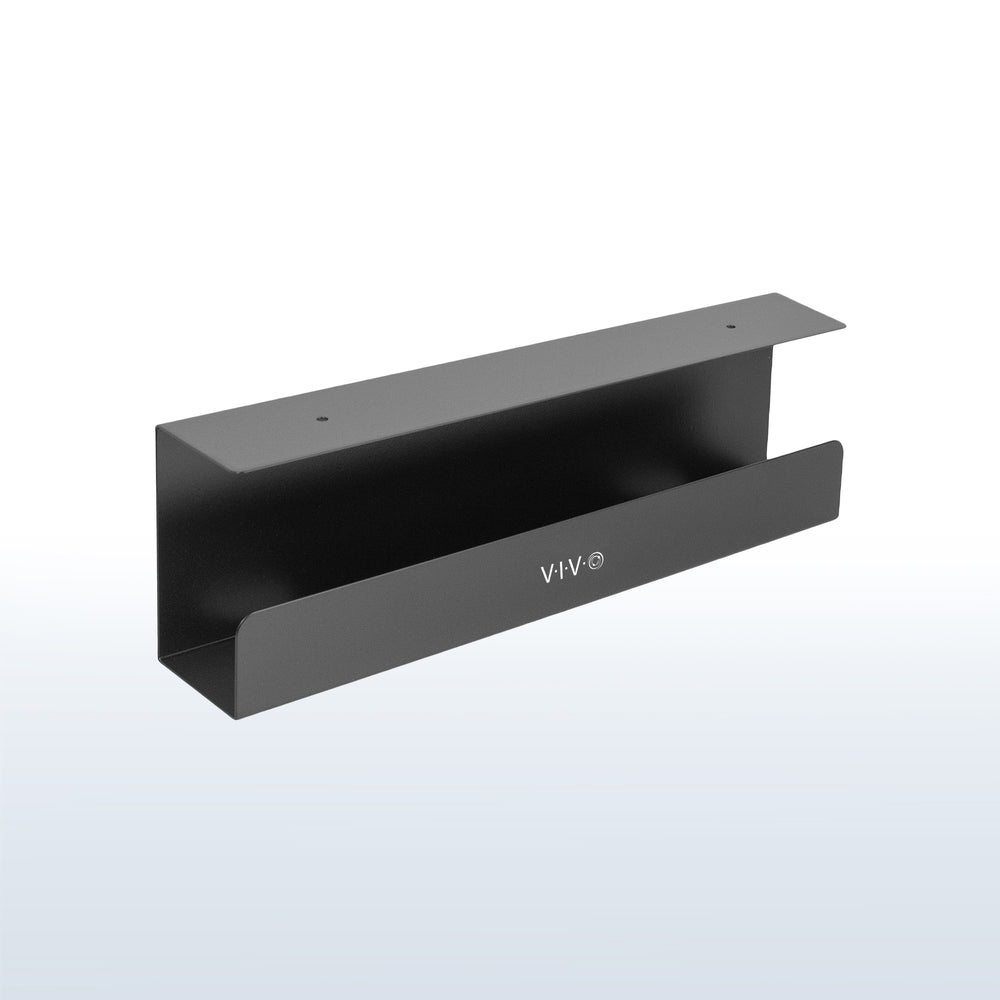
View VIVO DESK-AC06-1C 17-Inch Under-Desk Cable Tray on Amazon. Verify compatibility and the current offer before checkout.
Frequently asked questions
Can I mount it under a glass desk?
Do not assume so; the listed design relies on screws into a compatible desktop.
Will it hide all power bricks?
Check each brick against the usable tray width and depth; cable management and brick storage are different needs.
Is it suitable for a standing desk?
Only if cable slack, moving clearances and the installation guidance suit that desk.
Sources
- Amazon product listing — https://www.amazon.com/dp/B089B4XZM4
- Product documentation — https://www.amazon.com/dp/B089B4XZM4